Clear portrait
−33.7% yA face outranks clothing
Saliency settles on the subject’s torso. Face priority moves the crop anchor 34% of the image height upward.
BeforeSaliency only
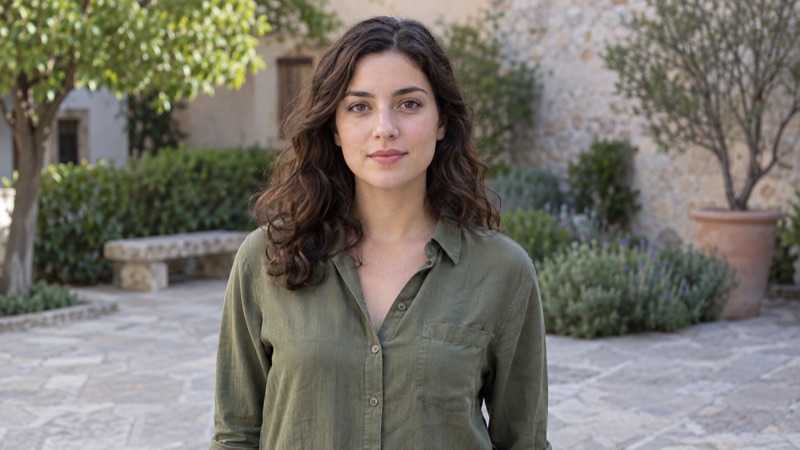
AfterFace priority
A small Go HTTP service that finds the best crop focus in an image. It prioritizes confidently detected faces with YuNet, then falls back to U²-Net saliency. You can also switch to Appwrite's FocalNet model. It never crops, stores, identifies, or modifies the submitted image.
The current pipeline runs YuNet first. A reliable face becomes the focal point immediately; without one, the same U²-Net saliency path continues unchanged. These comparisons use real model output from the integration fixtures.
Saliency settles on the subject’s torso. Face priority moves the crop anchor 34% of the image height upward.
Both faces clear the threshold. Area-weighted priority selects the larger foreground face.

A strongly blurred face does not pass the detector threshold, so U²-Net supplies the same saliency point as before.
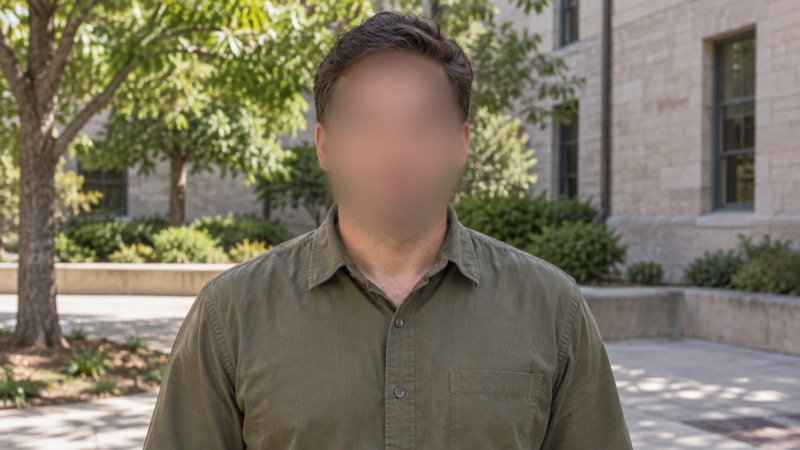
Green boxes are detected faces, the thicker box is the selected primary face, and each crosshair is the returned normalized gravity coordinate. No identity recognition is performed.
FocalNet is Appwrite's own model. It picks a crop and uses the crop's center as the focal point, without a separate face detector.
$ make model-focalnet
$ MODEL_BACKEND=focalnet ./autogravity
$ docker run --rm -p 8080:8080 \
    -e MODEL_BACKEND=focalnet \
ghcr.io/appwrite/autogravityAppwrite Storage accepts gravity=auto on the preview endpoint. When both width and height are set, autogravity finds the main subject and crops around its focal point instead of the geometric centre.
gravity=centerGeometric centre — subject cut offgravity=autoFocal point — subject kept in frame/v1/storage/buckets/{bucketId}/files/{fileId}/previewPass width, height, and gravity=auto to crop around the detected focal point.
?width=400&height=400&gravity=autoFastest path is Docker. The image includes verified YuNet and U²-Net models plus the CPU-only ONNX Runtime library.
$ docker run --rm -p 8080:8080 ghcr.io/appwrite/autogravity
$ docker build -t autogravity .
$ docker run --rm -p 8080:8080 autogravity
Or build from source with Go 1.25 or newer. make model downloads and verifies the ONNX models. Use make model-focalnet if you want Appwrite's FocalNet weights.
$ make model
$ make build
$ ./autogravitySend a JPEG, PNG, WebP, or GIF image as a multipart image field, or as the raw request body.
/analyzeReturns a face center, a saliency focal point, or a FocalNet crop center.
curl -sS -X POST \
  http://localhost:8080/analyze \
-F 'image=@photo.jpg'{
"gravity": {
"x": 0.68,
"y": 0.37
},
"confidence": 0.91,
"source": "face"
}Coordinates are in [0.0, 1.0], measured from the oriented image's top-left corner. EXIF orientation is applied before analysis. On the default backend a reliable face supplies its bounding-box center; otherwise U²-Net supplies the saliency centroid. Set MODEL_BACKEND=focalnet to use Appwrite's model instead. source is then focalnet and the response includes a crop rectangle. Confidence is that strategy's model score, not an identity match or a calibrated probability.
curl -sS -X POST \
  http://localhost:8080/analyze?aspect_ratio=16:9 \
-F 'image=@photo.jpg'{
"gravity": {
"x": 0.52,
"y": 0.41
},
"confidence": 0.91,
"source": "focalnet",
"crop": {
"left": 120,
"top": 40,
"width": 480,
"height": 270,
"retained_importance": 0.88
}
}/healthzReturns 503 until the models are loaded, then 200 with {"status":"ok"}.
Requests default to a 10 MiB body limit (MAX_REQUEST_SIZE) and decoded images to 48 megapixels. Set MAX_REQUEST_SIZE to a positive byte count such as 10MiB or 10485760. Separate upload and analysis admission limits bound buffered-body and decoded-image memory without allowing slow uploads to reserve inference capacity. Both models are loaded once at startup and their inference sessions are reused across requests.
Historical U²-Net fallback timings on Apple M3 Pro, CPU-only ONNX Runtime 1.23.2, Go 1.25.14. Median of five sequential benchmark samples. Face-selected requests skip U²-Net. Performance varies with hardware and input images.